Software de mapa de red
Cada trabajo, sobre el mapa de tu red.
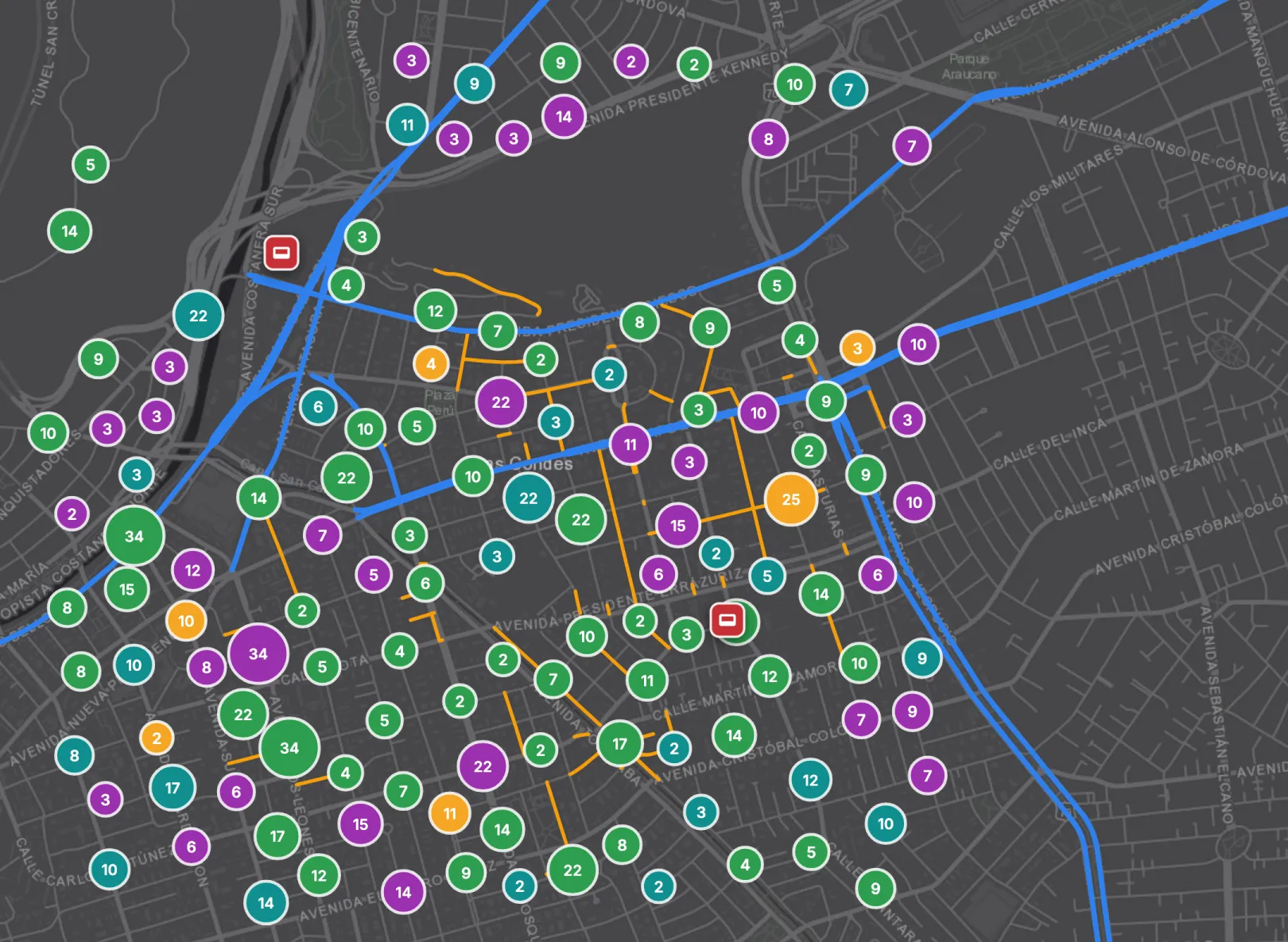
Tu red por capas, con cada tarea, formulario y cuadrilla donde pasa.
Ya trabajan con Sytex
La red y el trabajo sobre ella, en un solo lugar.
Tu red, por capas
Una capa por tipo de elemento, cada una con su color y su leyenda: troncal, distribución, cajas, splitters, sitios.
Tareas y formularios por estado
Abiertas, en proceso, terminadas o en espera, agrupadas por zona. Se ve qué parte de la red se atrasa.
Dónde está cada cuadrilla
La capa Personas muestra la última posición de cada técnico, al lado del trabajo que tiene asignado.
Vistas guardadas y tableros
Guarda las capas y los filtros que usas, publícalos como el mapa de la organización o pon el mapa en un tablero.
Importa el KMZ que ya tienes.
KMZ, KML o GeoJSON: las rutas entran como trazas y los puntos como cajas o sitios, con su historial. O dibuja la traza en el mapa.
Mide, busca y abre lo que está en el mapa.
Distancia por calle
De un punto a otro, por las calles o en línea recta.
Busca por dirección o coordenadas
O por el código o el nombre de un elemento, sin tener que ir a la zona antes.
Abre un elemento y ve su trabajo
Código, tipo, estado y campos, y desde ahí sus tareas, formularios y flujos.
El mismo mapa, con la red de cada sector.
Preguntas que nos hacen
¿Reemplaza a mi herramienta de diseño de red?
No. Sytex no es un inventario de planta ni una herramienta de diseño. Pone el trabajo de campo sobre tu red: qué se está haciendo, dónde y en qué estado. La red entra desde el KMZ o el GeoJSON que ya tienes.
¿Qué archivos puedo importar?
KMZ, KML y GeoJSON. Las rutas entran como trazas y los puntos como cajas o sitios, y la importación queda con su historial. Cada tipo toma el color y el icono de su capa.
¿Puedo ver dónde está cada técnico?
Sí. La capa Personas muestra la última posición de cada técnico, la que informa la app con el seguimiento de ubicación activado.
¿Puedo poner el mapa en un tablero?
Sí. El mapa va en un tablero con su leyenda, al lado del resto de los números del proyecto.
¿Quién ve qué en el mapa?
Cada persona ve las capas y los elementos que le permiten sus permisos. Una vista guardada puede quedar personal o publicarse como el mapa de la organización.
Empieza con tu KMZ y una semana de trabajo.
Cargamos tu red y te la mostramos con las tareas de un proyecto real.
Primero hablas con Alfred, nuestro asistente de IA, y después con el equipo.
Software de mapa de rede
Cada trabalho, no mapa da sua rede.
Sua rede em camadas, com cada tarefa, formulário e equipe onde acontece.
Equipes ágeis trabalham mais rápido com a Sytex
A rede e o trabalho sobre ela, num só lugar.
Sua rede, em camadas
Uma camada por tipo de elemento, cada uma com sua cor e legenda: tronco, distribuição, caixas, splitters, sites.
Tarefas e formulários por status
Abertas, em andamento, concluídas ou em espera, agrupadas por área. Dá para ver que parte da rede atrasa.
Onde está cada equipe
A camada Pessoas mostra a última posição de cada técnico, ao lado do trabalho atribuído a ele.
Visualizações salvas e painéis
Salve as camadas e os filtros que você usa, publique como o mapa da organização ou coloque o mapa num painel.
Importe o KMZ que você já tem.
KMZ, KML ou GeoJSON: as rotas entram como traçados e os pontos como caixas ou sites, com seu histórico. Ou desenhe o traçado no mapa.
Meça, busque e abra o que está no mapa.
Distância pela rua
De um ponto a outro, pelas ruas ou em linha reta.
Busca por endereço ou coordenadas
Ou pelo código ou nome de um elemento, sem precisar ir até a área antes.
Abra um elemento e veja seu trabalho
Código, tipo, status e campos, e dali suas tarefas, formulários e fluxos.
O mesmo mapa, com a rede de cada setor.
Perguntas que recebemos
Substitui minha ferramenta de projeto de rede?
Não. A Sytex não é um inventário de planta nem uma ferramenta de projeto. Ela coloca o trabalho de campo sobre a sua rede: o que está sendo feito, onde e em que status. A rede entra a partir do KMZ ou GeoJSON que você já tem.
Quais arquivos posso importar?
KMZ, KML e GeoJSON. As rotas entram como traçados e os pontos como caixas ou sites, e a importação fica com seu histórico. Cada tipo recebe a cor e o ícone da sua camada.
Posso ver onde está cada técnico?
Sim. A camada Pessoas mostra a última posição de cada técnico, informada pelo app com o rastreamento de localização ativado.
Posso colocar o mapa num painel?
Sim. O mapa vai num painel com sua legenda, ao lado dos demais números do projeto.
Quem vê o quê no mapa?
Cada pessoa vê as camadas e os elementos que suas permissões permitem. Uma visualização salva pode ficar pessoal ou ser publicada como o mapa da organização.
Comece com seu KMZ e uma semana de trabalho.
Carregamos sua rede e mostramos com as tarefas de um projeto real.
Você fala com o Alfred, nosso assistente de IA, e depois com o time.